



Interested in joining the post-analysis efforts? Send an email to Veselin.B.Kostov@nasa.gov.
FAQ
Send us your questions through the TALK network! We'll pick the most frequently asked ones and answer them here.
How To Use This Site
What are the images I see? The images you see are pictures of stars taken by NASA's TESS mission. Usually these are square images with a size of 11 by 11 pixels, where each pixel is about 20 arcseconds wide. Ideally, there will be a single bright source near the middle of the image, spread over several pixels. But that's not always the case!
What is the red dot on these images? How do you use it? Along with the star(s) on each image, there will also be a single red dot. The dot represents the "center of light" as measured by computer. That's what the computer thinks is the position of the brightest source on the image. We will use the red dots to help distinguish between a genuine planet candidate and a false positive signal. If the red dot coincides with the target star--which should typically be near the center of the image--then the target star is probably producing the observed transits and we indeed have a good planet candidate. However, if there is no well-defined, single source of light near the center of the image and/or the red dot does not coincide with said source, and/or the images do not show a single, well-defined source of light at all, then the "center of light" is either not well-measured or the observed transits are probably false positives.
Where can I find information about the star I am looking at? Start by clicking on the "i" in a circle button that's underneath the image you classified. A pop-up will appear with a link that looks like this: "Link: https://exofop.ipac.caltech.edu/tess/target.php?id=177160057" Click on the link and it will take you to a page in the "ExoFOP" catalog with lots of information about the target! ExoFOP stands for "Exoplanet Follow-up Observing Program".

If you're hungry for still more information on this target, scroll down the ExoFOP page and look for the "External Links" on the lower left.

Click on those links to view information about your target in four other catalogs: IRSA, SIMBAD, MAST and Keck Observatory Archive.
What does TIC stand for? "TIC" stands for TESS Input Catalog. The TIC catalog name looks like "TIC NNNNNNNNN". Once you have your star's TIC catalog name, you can find images of the star and more details at the Mikulski Archive for Space Telescope (MAST). In the upper left of the page, you'll see the words "Select a collection...". Choose "MAST Catalogs" from the drop down menu. Then use the "Mission:" drop down menu to navigate to "TESS Input v8". To the right, the screen says "and enter target:" Type the name of your star into that box as "TIC NNNNNNNNN" and click "Search".

Can't some of this work be done by a computer? Yes! Most of work of identifying false positives in TESS data can be done by computer. To distinguish between a real TESS planet and a false positive, we begin our process using the automated vetting pipeline DAVE:

Briefly, DAVE evaluates whether detected transit-like events are real or false positives by analyzing the data for: (a) odd-even differences between consecutive transits or secondary eclipses (indicating an eclipsing binary instead of a transiting planet); (b) stellar variability mimicking a transit (indicating an astrophysical false positive); and (c) center-of-light shifts during transit (indicating that the target star is not the source of the transit-like events).
But not all planet candidates submit to our automated methods. The most interesting targets, the smallest ones, only create a faint signal, which tests the limits of our software. Your work here at Planet Patrol is helping us refine our software and check the marginal cases--i.e., the most interesting ones.
How Do I Use SIMBAD? SIMBAD (the Set of Identifications, Measurements, and Bibliography for Astronomical Data) is another handy database of astronomical objects used by professional astronomers. You can look up your favorite star there as well and find different information about it than what's in MAST. To look up a star in SIMBAD, clicking on the "i" in a circle button that's underneath the images you classified and write down the star's "RA and dec" coordinates. Then go to SIMBAD's coordinate query page and type them in and hit return. We recommend setting the search radius on SIMBAD to 2.5 arcminutes.
If SIMBAD only finds one source on the image you're looking at, it will take you directly to a page of information about that source. Otherwise, SIMBAD will show you a list of astronomical objects listed in order of their distance from the center of the subtile. Click on the links to learn more about the objects that SIMBAD finds!
SIMBAD uses a long list of abbreviations in its tables. For example, PM* = high proper motion Star, BD* = brown dwarf, BD? = brown dwarf candidate, WD* = white dwarf. You can learn more about SIMBAD from this Users Guide.
One of the most useful features of SIMBAD is that for each object in the catalog, it pulls up a list of papers that have been written mentioning that object. Scroll down and 3/4 down the page you should see "References". You can click "sort references" and see the titles of papers where your favorite object has been mentioned or discussed, if there are any. Be sure to browse through these; your favorite object may already be the focus of a huge international debate--or it may just have played a bit part as a calibrator or an astrometric reference.
You can also access SIMBAD through ExoFOP-TESS by clicking on the "i" in the circle and follow the corresponding link to ExoFOP-TESS. A link to SIMBAD for the target you are looking will be in the lower left corner on the ExoFOP-TESS website.
The Science of Exoplanets
What is a transiting exoplanet? An exoplanet is a planet orbiting a distant star. A transiting exoplanet is an exoplanet that periodically blocks a small fraction of the light of its parent star as it orbits around the star.
What is an eclipsing binary? An eclipsing binary is a system of two stars that orbit around each other and their orbit is oriented in a way that they periodically block each other's light as seen from Earth.
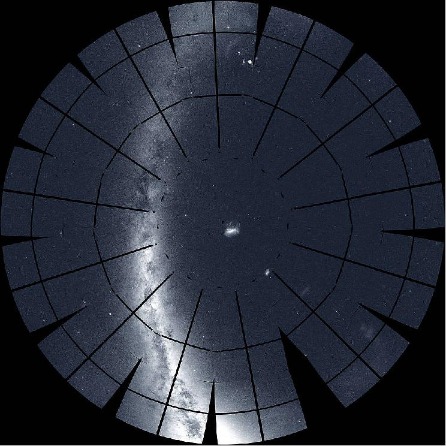
What is TESS? TESS is NASA's new exoplanet mission designed to find thousands of transiting exoplanets. TESS will measure the brightness of more than a million stars, creating a data set that will be a challenge to fully understand without help from citizen scientists. By the end of the mission, TESS will have observed nearly the entire sky for at least a month, tiling it with thirteen partially overlapping sectors per hemisphere, per year. You can see one month of TESS observations here. We expect the mission to discover thousands of planets orbiting nearby stars (called "exoplanets") by detecting tiny decreases in the brightnesses of the stars produced by an orbiting planet that is blocking a small part of the disk of its host star--just like Venus transits the Sun as seen from Earth.
How is TESS related to Kepler? TESS is not NASA's first mission to find transiting planets. Before TESS, there was NASA's Kepler mission, which discovered more than 4000 transiting planets. Kepler searched a small portion of the sky for planets, while TESS is searching almost the whole sky. To search such a large area, however, TESS's designers gave it a smaller primary mirror than Kepler, 10 centimeters as opposed to 1 meter.
After two gyroscopes on the Kepler space telescope failed, this telescope embarked on a second mission, called "K2," which searched yet a different part of the sky. Citizen scientists in the Planet Hunters TESS project and the Exoplanet Explorers project have helped comb the data from both NASA's Kepler and K2 missions, and have discovered dozens of new exoplanets, including rare and intriguing objects like a planet with four suns in the sky, or Boyajian's star.
What do astronomers mean by the word "confusion"? When there are many stars or galaxies near one another in the same part of the sky, it can be hard to tell them apart in space telescope images. The smaller the telescope mirror, the worse this problem gets. Confusion is a major source of noise for TESS, and a major reason we need help from citizen scientists to decipher TESS data.
Here is an example of confusion, using images from the Kepler telescope. Look at how Kepler saw star KOI-258 (left image) compared to how a larger telescope saw it (right image). What Kepler thinks is a single stars turns out to be three stars!

Now imagine if we only had the left image above, and that the measured brightness of the image periodically changes--suggesting a potential transiting planet! But there are three stars; which star is causing the changes? Is it a small planet around a bright star (left image below), or an eclipsing binary star in the background (right image below)? Or something else?

In the case of KOI-258 it turns out that the star is an eclipsing binary instead of a transiting planet. This confusion problem is bigger for TESS!
Can't some of this work be done by a computer?
Planet Patrol is built on results produced by a computer algorithm. However, these results can sometimes be unreliable, especially when the number of detected transits is small and/or their signal-to-noise is low due to e.g. instrumental and/or astrophysical artifacts. The algorithm measures the center-of-light of the images you see here (the red dots), regardless of their quality, and automatically compares it to the catalog position of the corresponding star. Evaluating the per-transit image quality is highly non-trivial as each target star has its unique data quirks, issues, and systematics, and sometimes the differences between a good image and a bad one are subtle.
Hashtags
A good option to streamline classification is to use hashtags. Check out the field guide and the talk for suggestions like #offcenter (i.e. bright spot near the edge of the image), or #negative (image is a bright background with dark spots), or #stripes (horizontal and/or vertical bands across the image) -- or invent your own! Hashtags also enable a quick and easy way to search for particular subjects.
Are there other Citizen Science projects for exoplanets?
Yes! Zooniverse has another active project about TESS exoplanets, called Planet Hunters TESS (https://www.planethunters.org). At Planet Hunters TESS you'll inspect TESS light curves. Some of the planet candidates from Planet Hunters TESS may then arrive here at Planet Patrol for us to vet!
How is Planet Patrol different from Planet Hunters TESS?
Planet Patrol looks at objects that represent a detected planet candidate in TESS data. Planet Hunters searches through all the stars in the TESS databases, and asks you to find such candidates.
Think you've caught one?
Do you think you caught a false positive? An example of a false positive would be a single, well-defined bright spot (with a red dot near the middle of the spot) that is outside the dashed contour you see on the image. The dashed contour is centered on the target star and marks the pixels used to create the lightcurve. The following image shows how a typical false positive looks like:

You can tag such images on TALK with a hashtag #false_positive. You can also fill this Google Form where we keep track of the potential false positives. After you submit a subject, be sure to flag it on TALK with the #submitted hashtag.
Want to do more with Planet Patrol?
Are you interested in learning more about Planet Patrol and/or getting involved with the project beyond contributing classification? If so, you can send us your email through the above-mentioned Google Form and we will add you to our advanced user Google Group.