


Want more Florida Wildlife? Check out our expansion project Florida Wildlife Watch
FAQ
Why are there so many deer photos, or so few photos of species x?
Why is there no "I don't know" button? How should I classify an animal I truly can’t identify?
How do I count and distinguish adults from young, and what do you mean by "young"?
Why is there a button for humans?
How can I share a photo I want help classifying or would like to share with others?
What should I do if I get an "Already Seen" banner?
It’s difficult to tell species apart!
What should I do if I come across photos of a sick/injured/dying animal?
Why are there so many deer photos, or so few photos of species x?
This is a great question. The primary reason is simply that there are lots of deer in the Everglades, and you are more likely to encounter abundant critters than less abundant critters. This is a main principle of many wildlife monitoring programs: we expect the likelihood of seeing or catching an animal to be directly proportional to its population size. When working with trail cameras, however, there a few other factors that affect how often certain species are seen:
Larger animals are more likely to trigger a trail camera than smaller animals. The camera only fires when an object warmer than the background crosses the plane of separate motion-detecting beams. A mouse can trigger a camera, but only if it is close enough to cross multiple motion-detecting beams at once.
Large animals often heavily use trails to make travel easier, and cameras are preferentially placed along wildlife trails to capture these species.
Animals that spend more time in motion and use more space are more likely to be photographed. Animals that commute long distances daily to feed or hunt (such as coyotes) may be detected more frequently than animals that move shorter distances.
Smaller animals are more likely to be overlooked in photos. That's why it is important to scan the photo thoroughly before determining if there's indeed "nothing here".
In South Florida, deer and bobcats are very frequently photographed because both species are abundant, large, mobile, and tend to use paths that people can identify.
Why is there no "I don't know" button? How should I classify an animal I truly can’t identify?
The Snapshot Serengeti blog has a great post about this that we are largely paraphrasing below. We know it is not possible for us to classify all pictures - some photos are poor quality or capture animals at a strange angle or moving quickly. However, please give even the poor quality photos your best shot! And please do a thorough scan of the photo before defaulting to "nothing here". Here's why:
It is better to have some idea about the animal in the photo than no data. If you are uncertain and classify a photo incorrectly, it does not ruin the data! In fact, the more disagreement there is regarding a photograph, the longer it stays active for viewers (to a limited point). For example, if the classifications disagree but include fox and coyote, that tells us the animal is probably a canid of some sort. We learn a lot more than we would if we allowed people to say "I don't know" and be done with it. Furthermore, photos tagged as having nothing in them are quickly deactivated - when that happens we assume there is nothing but vegetation in the photo, so please do spend a little time to look for hard-to-see critters.
When pictures are difficult to classify, we suggest using the classification filters to help narrow the potential range of choices. We've including filters for "looks like" (to filter based on whether the animal looks like a bird, dog, rodent, etc.), and body size (small vs. large), Also check out our field guide (click the tab on the right side of your screen) for more help identifying local species.
Fast moving animals are difficult to identify, but users should still take a guess!
How do I count and distinguish adults from young, and what do you mean by "young"?
Some animal choices, like deer, ask you to give counts for adults and young separately. Others, like bobcat and raccoon, ask for just one total count but have a "young present" checkbox. When you classify these, young should be included in the count AND you should select "yes" when asked if young are present. For example, if you see 1 adult bobcat with 2 young kits, the count would be 3 and you would click the "young present" button.
Distinguishing adults vs. young allows us to understand reproduction rates in a given species. We are defining "young" as offspring of the year -- animals less than one year old. For most species, it is very difficult to tell young that are past age one from adults. In fact, most juveniles will be more or less indistinguishable from adults by late autumn, and offspring of solitary animals will typically leave their parents around this time.
Body size is the most obvious way to distinguish adults from their young. Luckily, during spring and early summer, juveniles are often accompanied by an adult so that the size difference can be seen in photos. Keep in mind, however, that the season in which the photo was taken may not correspond to the season in which you are viewing it.
Another way to distinguish young from adults is by their different markings or builds. Examples:
Deer fawns have spots and are about as long as they are tall. Adult deer do not have spots and are longer than they are tall (rectangular build).
Turkey young (poults) lack the bare blue heads of adult turkeys.
Canid pups and bobcat kits typically look ‘blockier’ than adults, with relatively short legs, large feet and large heads.
Why is there a button for humans?
We sometimes get photos of people using the same trails as animals do. Please mark any photo sequence containing a person OR vehicle (car, truck, boat, etc.) as human. Human photos are more quickly retired from the classification pool than other types of photos, which helps protect people's privacy. We would appreciate that all human or vehicle photos be treated the same, regardless of how much is visible or how far away from the camera it is. PLEASE do not "Talk" about these photos or mark them with a hashtag - any photos of humans that end up on "Talk" will be deleted immediately. If you have concerns about a particular set of images, please message a team member with the subject ID information instead of sharing it to the talk boards. You can find team member user names along the right hand side of the "Team" page.
How can I share a photo I want help classifying or would like to share with others?
Zooniverse allows users to share photos they come across as they are classifying by clicking "Done & Talk" instead of "Done." A photo can only be shared after the user provides a classification (see "Why is there no "I don't know" button? How should I classify an animal I truly can’t identify?" above for more information on this topic). Sometimes the photo will have been shared previously by another user, and earlier comments can be read by scrolling down the page.
Users may also use hashtag to assist in sharing the photo with others. This is neat little trick that adds a linked tag to a photo so that after classification users can view all the photos that have been given the same hashtag. Simply use the pound sign (#) and a word (with no spaces) to add a hashtag to the photo. For example, if you see a panther and want to note it as such, you could add the hashtag #panther.
PLEASE do not create a hashtag if you are not sure your classification is correct. For unknown IDs, you can post photos in Talk to ask other users for help with classification using the hashtag #whatis
To hashtag animals with a common name that contains more than one word, separate the words using an underscore. For example, use the tag #gray_fox if you would like to share a photo of a gray fox.
We encourage users to use #supersnap to highlight photos that are particularly interesting, rare, or high quality.
Other commonly used hashtags include (but are not limited to):
#predation
#interesting_behavior
#multi_species
#interaction
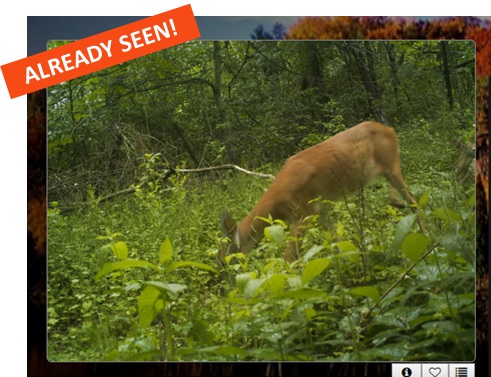
What should I do if I get an "Already Seen" banner?
This is actually a great sign and indicates that we are getting near the end of the Season! Each photo needs at most 10 different volunteers to classify it before it is retired. This means that photos stick around in the system until enough volunteers have classified them. Because we serve up photos randomly to our volunteers, those who have done many classifications will start seeing the "Already Seen" banner more often as fewer photos remain.
If you see the banner, the best thing to do is to click refresh on the page and get a new photo. The reason we don't want you reclassifying the photo is that you are likely to classify it in the same way. It is better to have different individuals classifying a given photo--to get a "second opinion" from someone new, rather than duplicate the classification effort.
You may also see this banner or a "Finished" banner when the project is out of data. To verify whether the current dataset is active, check out the progress bar on the home screen. If it reads 100%, the data has been completely classified. The project team will be preparing the new dataset in the meantime.
It’s difficult to tell species apart!
It certainly can be! It can be especially tricky to tell apart canids (coyotes and fox), mustelids (minks and otters), and felids (bobcats and panthers). Check out our field guide (click the tab on the right side of your screen) for more info on distinguishing these and other species.
What should I do if I come across photos of a sick/injured/dying animal?
If you come across a subject of a sick/injured/dying animal, we ask that you classify the photos as normal. The subject should not be shared to the Zooniverse talk board if the images could be interpreted as graphic or disturbing to some people. In the event that you come across a subject like this on the talk boards, please report the post so it can be reviewed by a Wildlife Watch team member.
FAQs adapted from Snapshot Wisconsin and Snapshot Serengeti