


This project is now complete. Please find our new home at Notes from Nature - Capture the Collections / Ce projet est désormais complété. Vous trouverez notre nouveau site web à l'adresse suivante : Notes de la nature - Capturer des collections
FAQ
Frequently Asked Questions
1. What is a lichen anyways?
A lichen is a symbiotic organism formed from a partnership between a fungi, and an algae, and/or cyanobacteria.
Lichens are important organisms and their uses are wide and varied. Included in the diets of many animals, they are the primary food source for Caribou in the winter months. Animals also use lichens for nesting materials and (in the case of tiny invertebrates) microhabitats. On a landscape scale, they provide important in erosion control and convert nitrogen to forms that can be used by plants and animals. Human uses include for medicine and dyes.
2. Multiple collections on one sheet
In the past, multiple collections were mounted on one sheet as a way to bring down costs. You can tell there are more than one collection on a sheet by multiple barcodes and collection labels. Here’s an extreme example:

When you're working with an image of a specimen that has two or more collections on it, proceed as follows:
-
Click the “(i)” icon on the lower right-hand corner of the Zooniverse interface, right below the image

-
This is the metadata button – it will provide you with the file name, which corresponds to our barcode number
-
Find the barcode number that matched the metadata information from “I”

-
Enter the data closest to or in line with that barcode and proceed through the workflow.
Use the “done and talk” button if you are having a problem to flag the specimen for the team.
3. Collection date confusion
Dates are now entered using drop-down menus
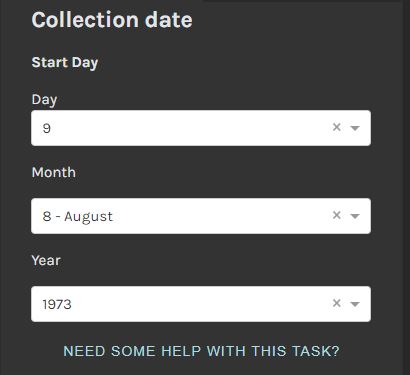
The below information will help you determine the date format. When you are ready to enter the date, select the appropriate day, month, or year from the drop down lists. For more help with these tasks, please see the Need some help with this task link below each task.
See our field guide Interpreting collection numbers and dates for examples of confusing collection dates!
When dates are written with numerals, it can be unclear which part refers to the date, and which refers to the month. The Canadian standard for dating uses a Year-Month-Day format, but that’s not how all countries work. Because our research focuses on Arctic specimens, there is a trick to figuring out dates.
Arctic research occurs in the summer months (guess why!), and so collections usually occur between June (06) and September (09).
So, if a label has the date “02-09-1934” you can safely assume the date refers to September 2, 1934 rather than February 9, 1934
We have also encountered labels from European collectors that use roman numerals to denote the months, such as
03-vi-1953
This would be transcribed as 1953-06-03 in our workflow.
Transcribe the date that appears on the label. Sometimes, collectors omit the year, month or day. Transcribe whatever is provided. For instance, if the collector only identified the month and day, e.g. August 28, transcribe the date as 08-28
For possible clues, you can also check out https://en.wikipedia.org/wiki/Date_format_by_country for a list of date formats by country.
4. How should I handle special characters on labels?
See this great thread made by one of the volunteers – Useful info for transcribing for special characters, collector names, and more!

You may have noticed some collector names include special symbols, like accents or umlauts, like this one:
Mäkinen, Yrjö
There is no need to add the special characters – you are welcome to use the nearest equivalents from the standard North American keyboard, as such:
Makinen, Yrjo
But, if you’re keen to use the alt+ codes to get the special characters, you can visit sites like https://sites.psu.edu/symbolcodes/ from Penn State to get the codes. Alternatively, you can paste special characters from MS Word into the transcription page.
5. How should I enter the collector names? Every label seems to have a different format!
Our required format is Last Name, First Name/Initials
Reading labels can be challenging! Names can come in a variety of formats, such as
- Last Name, First Name, Initial (e.g., Sokoloff, Paul C.)
- Last Name, Initial(s) (e.g., Porsild, A.E.)
- First Name, Last Name (e.g., Laurie Consaul)
- Intials Only (i.e. K.S.M)
- No name at all!
Always use the Last Name, First Name/Initials format, with one exception: If the collector uses only initials (as above, K.S.M.), then enter that verbatim.
If there is no name, or you cannot read it, leave the field blank. You can always use the "Done and Talk" button to leave notes about the specimen for our team
6. How do you handle multiple collectors?
Research is more fun and productive (and safe) with friends! Often, we'll see multiple collectors on labels. Using the naming format from above, separate the collectors as follows:
First Collector; Second Collector; Third Collector...
...and so on, until all names are entered.
For example, if all the collectors in the previous example went on a research trip together and collected specimens, the collector data would read:
Sokoloff, Paul C.; Porsild, A.E.; Consaul, Laurie; K.S.M.
7. I can't find the Collection Number!
Although most collectors do add collection numbers to their specimens, they aren't used by some collectors and in some situations.
Simply leave the field blank
See our field guide Interpreting collection numbers and dates for lots of examples of collection number variations
8. Help! The image is sideways!
Oops! Sorry about that. When this happens, simple click on the rotate icon highlighted here. You can also report the image with the Done and Talk button.

9. The layout seems off, why is that?
We have been testing a variety of browsers, and have had success with Chrome, Microsoft Edge, Firefox and Internet Explorer. Other users have had varying results.
On a tablet (iPad), we struggled to zoom in on the label and be able to enter data into the fields. This platform seems better suited for personal computers.