




FAQ
Task
How can I tell if a set of tracings is clustered correctly?
If the Tutorial, Field Guide, or Need Some Help With This Task are not able to help you decide if a specific case is clustered correctly or not, you can post a comment in the Help section of the Talk page about the galaxy. If you used your best judgement and want to classify the case, but you have a question, you can click Done and Talk to leave a comment on a specific galaxy for the researchers or other volunteers. Including a hashtag in your comment (for example: #underclustered, #overclustered, #over_and_underclustered, etc.) can help group similar galaxies together. You can also create collections of similar cases by clicking ADD TO COLLECTIONS at the bottom-right of the viewer.
Why did the researchers choose to not show the original image of the galaxy?
The original galaxy image doesn't factor in to our algorithm's attempt at grouping people's tracings. We believe that directly presenting this extra information will add confusion or bias to the task.
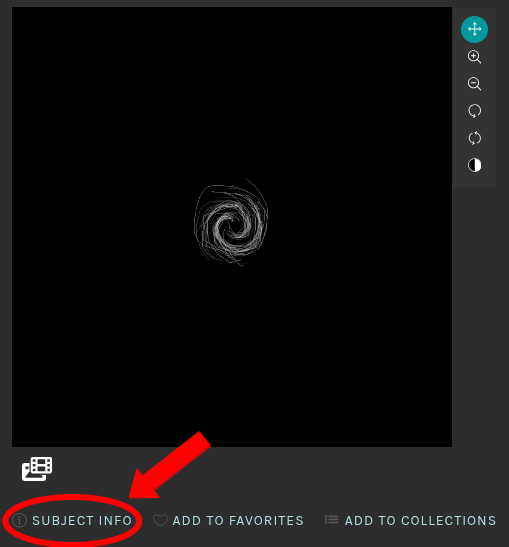
We do understand the appeal of the original galaxy images though, so we added image links as supplemental information. You can view the original galaxy image by clicking the Subject Info link ("i") below the images. In the metadata you will find links to SDSS_data and Legacy_Survey_image which will show you what the original galaxy looked like.
Why do some of the clustered lines look white in color? Is white used as a clustering color?
We do not use white as a color to indicate a cluster. White/gray is used only to show the aggregate tracing image and not a set of clustered tracings. Some clustered lines may appear white when certain colors overlap in the cluster image. For example, if a blue cluster line overlaps a red cluster line, it may appear white-ish instead of blue. We also noticed that when blue overlaps green, it appears yellow.
One way to double check how many clusters to expect in the image is by clicking the Subject Info link or "i" button found along the bottom of the images. There you will find a parameter called number_of_clustered_arms that will tell you how many clusters or arms were generated by our algorithm.
Is there a way to skip a galaxy and try it again later?
Yes! If you refresh the page in your browser, a new random galaxy should appear from those that you have not yet completed. The only exception is if the galaxy you are trying to skip is the last one in the sample, you won't be able to skip it.
How do I report a problem image or technical issue?
If you run into some kind of problem, the easiest thing to do is create a post in the Help section. You can also add hashtags (for example: #help, #bad_image, #technical_issue, etc.) to images when you click Done and Talk on a task. This will organize problem cases.
Science
What is spiral arm pitch angle?
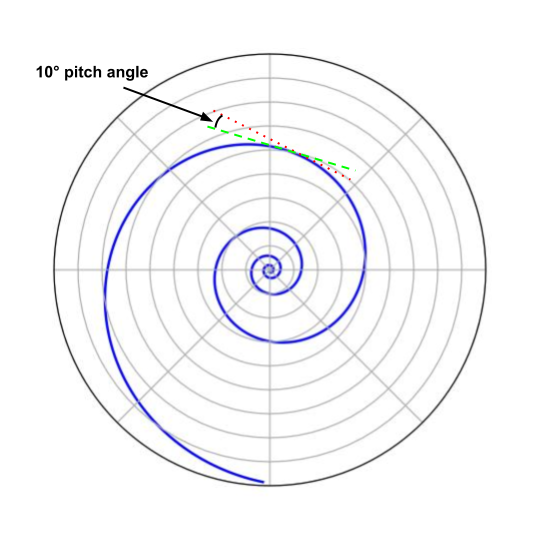
The pitch angle of a spiral arm is the angle between a line tangent to a spiral arm at a given radius (red dotted line) and a line tangent to a circle of the same radius (green dashed line). A small pitch angle means the arm is tightly wrapped and approaching circular winding (0° is a circle). A large pitch angle means the arm is more open and approaching a ray whose origin is the center of the galaxy (90° is a ray).
How do I find more scientific information about a specific galaxy or set of tracings?
You can find a galaxy's metadata by clicking the SUBJECT INFO link at the bottom left corner of the viewer (see the image below). The metadata for each galaxy includes the right ascension (ra) and declination (dec) coordinates, aggregated information found on HyperLeda (LEDA_data), information found on SDSS (SDSS_data), a sky survey image from the DESI Legacy Imaging Surveys (Legacy_Survey_image), and the number of clusters in the image (number_of_clustered_arms).
-
HyperLeda is a database of collected measurements that are published in scientific journals. When multiple measurements of the same parameter are performed by different authors, the results are combined and the average value is given. Some examples of measured galaxy parameters available in Hyperleda are:
- Celestial position
- Alternate names
- Morphological (or Hubble) type
- Inclination to the line of sight
- The ratio of the major to minor axis
- B-band absolute magnitude
-
SDSS (the Sloan Digital Sky Survey) makes use of multi-filter imaging and multi-object spectroscopy. Some examples of galaxy data that SDSS provides are:
- Celestial position
- A combined multi-filter image of a galaxy
- u- , g- , r-, i-, and z-band magnitudes
- Redshift
-
DESI Legacy Imaging Surveys (Dark Energy Spectroscopic Instrument Legacy Imaging Surveys) provides a sky browser that allows you to view a combined multi-filter image of a galaxy and explore the surrounding sky.
Where can I learn more about galaxies in general?
Check out our Education page where we have developed three learning modules that cover the fundamentals of galaxies. The modules are aimed at high-school-level students.
Are there other opportunities to get involved in science and space exploration?
If you have an interest in science and space exploration and are looking for opportunities besides people-powered research, check out the NASA https://www.nasa.gov/get-involved website. There you can learn about hackathons, challenges, competitions, and events open to the public.