




FAQ
Below are some Frequently Asked Questions from Disk Detective, discussing both how to use the site and the science involved. Thanks to the advanced user group from DD1.0 for helping to put this together.
“The question is not if but how. The game’s afoot.” –Sherlock Holmes
How to Use the Site
How do you determine an object is a good candidate?
An object is a good candidate if it appears round in the Pan-STARRS, SkyMapper and 2MASS images, shows no sign of objects between the inner and outer circles, only shows one object in the inner circle, stays on the crosshairs, and is not extended beyond the outer circle in the WISE images. Of course you already knew that by reading the buttons.
What is the “round” threshold?
A good candidate gives the impression of being round as you look through the flipbook, but the shape can look distorted in some of the frames. If it’s bright it might look “starlike”, surrounded by four spikes in the short wavelength images.
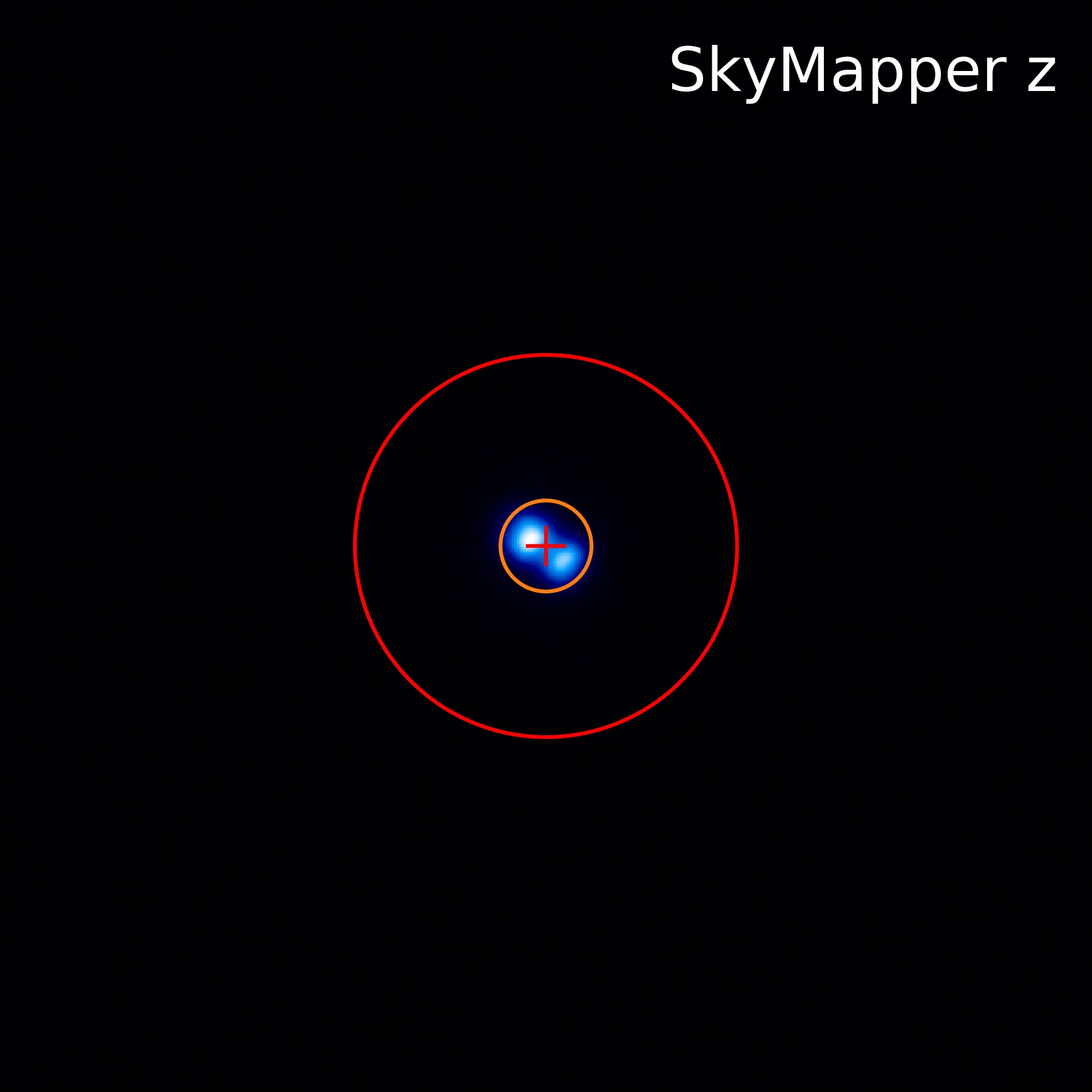
In some cases, an object can appear "not round" because the image reveals two stars that are close enough together that their light is blending in the image. Consider this image from DD2.0. You can see that it has two points that are blending together a bit in the middle. If you see this in PanSTARRS or Skymapper data, and the brightest parts of the two objects are both within the inner circle, you should select "Multiple objects in the inner circle."
What do I do if I think I discovered something?
If you found an object that you classified as "Two or more images show multiple objects inside the inner circle" or "None of the above" and you want to bring it to the science team's attention rapidly, here's what to do. First, be sure you've classified it (with one of those two classifications) and hit "Done and Talk!" Next, check to see if it has been previously published in the astronomical literature using the tools described below. Then, please fill out the "Think-You've-Got-One" form! Follow the links in the object's metadata to look them up on SIMBAD and VizieR (if they have data). If there are multiple entries in Gaia DR3 on VizieR, use the top row (closest in distance to the the coordinates of the object). For our purposes, we ask that you only submit objects to the Think You've Got One form if they either have no parallax measurement, or a parallax > 1.
Once you have submitted it, let others know that you have already submitted it using the #submitted hashtag on the subject's Talk page. If you don't fill out the "Think-You've-Got-One" form, we will learn about your discovery anyway from your classification, but it might take longer for us to get to it and follow up on your work.
When do you say there are “multiple objects between the two circles?"
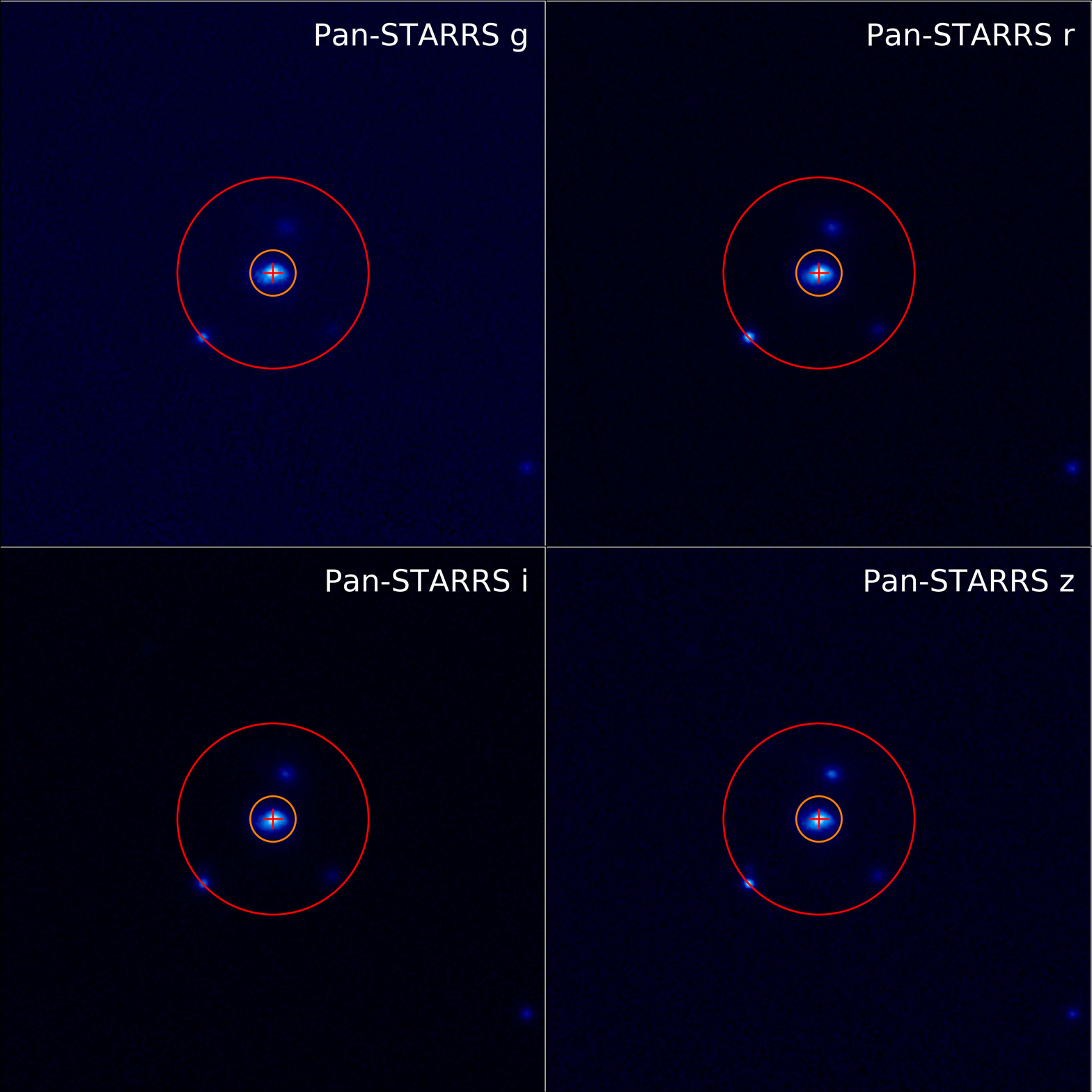
Let’s look at an examples from DD2.0. I count at least three background objects inside the red circle of this DD2.0 subject (besides the object in the center). These other objects could be contaminating the WISE data of the object we really care about, the one in the center of the circle.
How do you know if an object is “extended beyond the circle”?
An object is extended beyond the red circle if it clearly has structure that extends beyond the red circle. A faint, smooth blue halo that extends beyond the red circle is OK. Let’s look at some examples.
This subject from DD2.0 clearly has structure that extends beyond the outer circle. It looks like it’s next to a very bright source in WISE—and indeed it may well be sitting in a cloud of interstellar dust. Our Galaxy is full of interstellar dust that is not part of the dust disks we’re searching for. We often see objects on Disk Detective that consist of an otherwise dust-free star that just happens to be in front of (or behind) and unrelated blob of interstellar dust.
There is no “Redo” button. What happens if I have made a mistake?
It’s okay if you make a mistake now and then. Each image will be looked at by several Disk Detectives before the final results are published. This process generally yields results that are remarkably free of errors and bias—much more so than when a single scientist looks at the data alone. So forge ahead and try again!
Here’s an interesting example of how a different Zooniverse project (Galaxy Zoo) used their classification data to calibrate and remove human biases that might otherwise have gone undetected.
Where can I find more information about the subject I’m classifying apart from looking at the flipbook?
To find more information about the object you are looking at, look at the metadata by clicking the "i" button beneath the page. Here, you'll find information listed about the subject's WISE ID and image sources. You'll also find links to the object in SIMBAD, VizieR, and the IRSA Finder Chart. In the future, we'll be adding a link to the subject's entry in the Disk Detective database on the MAST archive, hosted by the Space Telescope Science Institute.
You can also view the subject's Talk page by clicking "Done and Talk" when you finish classifying, or by favoriting the object or adding it to a collection. On the Talk page, you'll be able to view comments by other citizen scientists on this object, and start a discussion on it.
The Disk Detective database on MAST lists photometry data (that is, brightness information at different wavelengths) for subjects from both Disk Detective 1.0 and Disk Detective 2.0. It includes data from Pan-STARRS, the AAVSO Photometry All-Sky Survey, 2MASS, WISE, and astrometry (position and motion) information from the Gaia survey. It also includes an image of the object's spectral energy distribution (SED), which plots energy as a function of wavelength.
The SED tells you where the energy is coming out as a function of wavelength; it’s an important tool for recognizing and classifying disks. Here’s a basic introduction to SEDs. And here are some examples of common SEDs you’ll see on Disk Detective.
How do I use SIMBAD?
SIMBAD (Set of Identifications, Measurements, and Bibliography for Astronomical Data) is a big database of astronomical objects; you’ll find that about half of the objects on Disk Detective have entries in SIMBAD. Here’s more information about SIMBAD. To look up an object in SIMBAD, click on the SIMBAD link in the object's metadata.
If SIMBAD only finds one source on the image you're looking at, it will take you directly to a page of information about that source. Otherwise, SIMBAD will show you a list of astronomical objects listed in order of their distance from the center of the subtile. Click on the links to learn more about the objects that SIMBAD finds!
SIMBAD uses a long list of abbreviations in its tables. For example, PM* = high proper motion Star, BD* = brown dwarf, BD? = brown dwarf candidate, WD* = white dwarf. You can learn more about SIMBAD from this Users Guide.
One of the most useful features of SIMBAD is that for each object in the catalog, it pulls up a list of papers that have been written mentioning that object. Scroll down and 3/4 down the page you should see "References". You can click "sort references" and see the titles of papers where your favorite object has been mentioned or discussed, if there are any. Be sure to browse through these; your favorite object may already be the focus of a huge international debate--or it may just have played a bit part as a calibrator or an astrometric reference.
If you want to learn more about an object and it’s not in SIMBAD, you can comment "#notinSIMBAD" on the object on Talk, and then click the link for "VizieR" in the metadata.
How Do I Use VizieR?
If you can't find what you are looking for in SIMBAD, you can use VizieR to query a longer list of astronomical catalogs--almost every catalog that has been published! We'll be writing up a much more thorough introduction to VizieR soon. But here are a few basic tips:
Unlike SIMBAD, VizieR gives you LOTS of source lists, one for each of the many catalogs it searches. Each list is in order of distance from location you searched (the coordinates given by the WISE ID). Each catalog it searches has its own special focus and caveats, so you may have to do some reading to get the most from this powerful tool.
VizieR queries many different databases simultaneously, so it may produce redundant or contradictory information! When you see contradictory information on VizieR, check the dates of the references—it’s generally better to trust the most recent reference. Also, note that if there are multiple objects in the search radius (default 10 arcsec) they will all pop up in the query. So you will have to take care that you are looking at the correct object.
How do I make a collection of my favorite objects?
Below the classification images you'll see an icon that looks like a list. This gives you the option to add a subject to an existing collection, or create a new collection of your own! You can view your collections and those of others, make comments on them, and ask questions on using the site and specific objects, on the project's Talk page.
Why can’t I see planets in the Disk Detective images?
Here’s a blog post with the explanation.
Why are the Skymapper images so pixelated? Why is there no apparent object in PanSTARRS or Skymapper?
Sometimes images from PanSTARRS or Skymapper look pixelated like a cheap 1980s video game. That happens when there’s no bright object in the field, and all you see is the detector noise. That can happen when the object we’re looking at is either cool or behind a cloud of dust (e.g. when it’s in the plane of the Milky Way). It should still show up in the longer wavelength images, though.
How big are the images we see on Disk Detective?
In astronomy, the way we measure the size of objects on the sky is using arcseconds, and sometimes arcminutes. If you have 20/20 vision it means you can see letters that are 5 arcminutes tall, which corresponds to 300 arcseconds. Here’s a Wikipedia article with more information about these small units of angle.
The images in the Disk Detective flipbooks are 1 arcminute across (60 arcseconds). The outer circle has a radius of 7.5 arcseconds, and the inner circle has a radius of 2.5 arcseconds. A super-human with good enough eyesight to make out an object the size of the red circle would have better than 20/1 vision.
Why do most of the images seem to grow longer at larger wavelengths?
Here’s a blog post that answers this question.
Some objects are noticeably bigger in the optical images than in the near IR, and can even look like donuts or black holes. Does this indicate that they are more likely to be nebulae or galaxies than stars? How should we deal with them?
Some objects will look much bigger in the blue images because they are brighter at those wavelengths and they are saturating the detector. When that happens, the central pixels in the image max out, and the object starts to appear much bigger than it would if the detector were behaving in a linear way. These objects can also show diffraction spikes and other shape distortions. If you see something that is saturated, select the "Not round" option, and comment on the Talk page with "#saturated."
How do I join the Advanced User Group?
If you have done more than 300 classifications on Disk Detective and you’re eager to get more involved, send an email to diskdetectives@gmail.com and ask to join the advanced user group. We’d love to have you!
About Our Science
How does this project relate to other Zooniverse projects?
While Planet Patrol and Planet Hunters TESS look at transit data, series of images where we look for dips due to planet transits over time, Disk Detective is focused on finding circumstellar disks. Circumstellar disks form as part of the same process as planets. In fact, our solar system has two debris disks--a warm one between Mars and Jupiter we call the asteroid belt, and a cold one past Neptune called the Kuiper belt. Finding circumstellar disks in WISE data suggests places for us to look for exoplanets with a variety of methods, including transits and even directly imaging the planet (detecting its infrared light in very-high-resolution images)!. Identifying new circumstellar disks also gives us more information on the process of planet formation--how long it takes, and what steps occur along the way.
What are some notable discoveries from Disk Detective?
We haven't had any notable discoveries from Disk Detective 2.0 yet (the version of the project you're working on). However, Disk Detective 1.0 identified more than 50,000 good disk candidates! Among these are many disks in young moving groups, the first Sirius analog (main-sequence star with a white dwarf companion) with a debris disk, and a whole new kind of disk: Peter Pan Disks. Citizen scientists Emily Burns-Kaurin, Milton K.D. Bosch, Katharina Doll, Hugo A. Durantini Luca, Michiharu Hyogo, Joshua Hamilton, Johanna J.S. Finnemann, Joseph R. Biggs, Alexandru Enachioaie, Philip Griffith, Sr., Fernanda Piñiero, Tadeás̆ C̆ernohous, Lily Lau Wan Wah, Art Piipuu, and Jonathan Holden all became co-authors on refereed scientific papers through Disk Detective. You can read more about these results on the Results page.