
Finished! Looks like this project is out of data at the moment!
Welcome to the ArchaeoZooArchive expeditions! From human’s best friends to a delicious fish dinner, help us use archaeological data to learn about the different kinds of animals that humans have interacted with through the past! Join us and delve into the legacy archives of animal specimen data from archaeological sites. Read more about ArchaeoZooArchive in our blog post! Visit the Florida Museum Environmental Archaeology Program at our website.
FAQ
This FAQ is only related to ArchaeoZooArchive expeditions
GENERAL TIPS:
-
There are 2 general task categories for entering these cards. The first set of tasks is only the information at the top of the card (site level information). The second set of tasks is the information in the lower part of the card (species information). The second set of tasks is entered one row at a time.
-
Try adjusting your screen brightness if you’re having trouble seeing something. Sometimes entries in pencil are very faint, so darkening your screen can help with that.
-
Use the magnifying tool if the writing is too small to read
-
If the handwriting is hard to parse, try checking the field guide or looking up what you think you see on your favorite search engine.
-
If there is information that is missing from any of the spots, please leave its corresponding text entry box blank as well.
-
If there is information that has a strike-through, do not enter that information, or if you do enter it for some reason (eg you aren’t sure it is a strike-through, could be a random pen-mark) then please note that in “Done and Talk”
-
Information that you cannot categorize or seems “extra” should be entered into one of the Other Information fields.
-
If there is something you are not sure about, or would like to tell us about, enter it at the end of the last task under “Done and Talk”. Anything extra you tell us will help us to clean the data at the end of our project
-
For example, you have entered an unclear notation as “UD”, but you aren’t entirely sure and it might have been “UID” or maybe even “WD” - tell us that in the “Done and Talk”.
-
Another example is that if your card has a drawing, you can enter “has drawing” in the “Other” category but then tell us more about it under the “Done and Talk.”
-
Or maybe you have found numbers with a “g” suggesting they are weights, so you entered them under “Wt=xxg” BUT you were not sure which specimen row they really went with, so you entered them with the first row, but can tell us you were not sure under “Done and Talk.” In this case, add the prefix to the numbers in the Quantity field. You may alse see "weight" written out or "Wt" with or wihtout a period "Wt." Be sure to enter them verbatim.
-
Or maybe, you weren’t even sure they were a weight, and might have been associated with the Site Information! That’s fine, just tell us and we can sort it out.
-
-
Quantities are tricky!
Remember to enter the information in this format: “quantity type”=“value”, for example #=2, MNI=25
If there is extra information anywhere on the card that is in the format of “[number]g” and is linked to one of the specimen rows, that means it is a weight (in grams) and goes in “quantity” as “weight=[number] g” for the specimen row with which it is associated.-
There will be other types of information that should be entered into the “Other Information” field. Here are some examples:
-
Sometimes there will be information on the processing the specimen has gone through- “Cut” or “Burned” is common.
-
There may be information on the age of the animal the specimen came from such as “juvenile” or “adult”.
-
If there is some other notation and you can’t tell what it is related to, it goes in the Other field.
-
You may see the UF Number on two different specimen lines, such as UFNumber 01660570 in the example below. In these cases there may have been mistakes in the original data entry when catalog numbers were assigned. These should be entered as is.
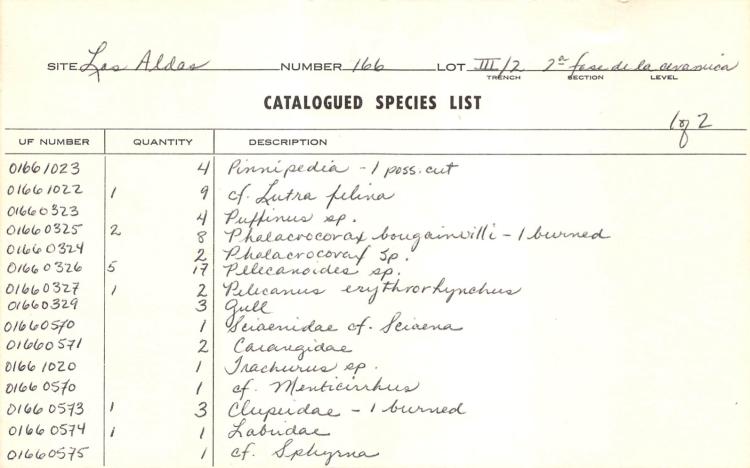
You may encounter two groups of entries at the bottom of a card such as in the example below.
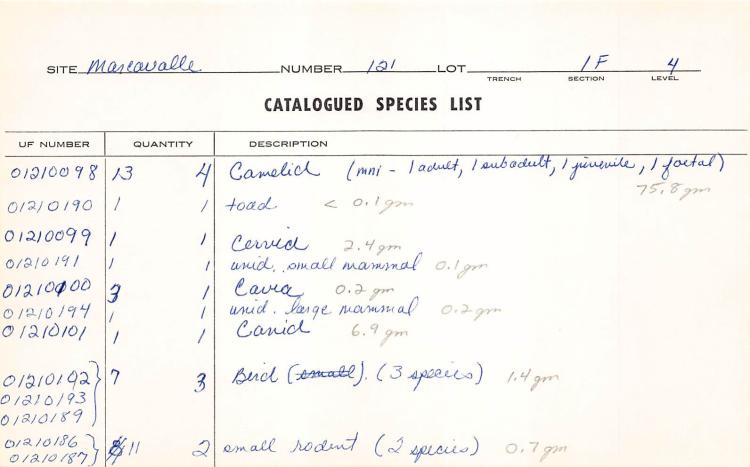
The first has three UF numbers representing 3 species of bird. In these cases enter all three UF numbers in one entry, separated by commas: "01210192, 01210193, 01210189"