



Finished! Looks like this project is out of data at the moment!
FAQ
Transcription Workflow Questions
What if I can't complete an entire page? Can I save my place and come back?
We currently don't have an option to save your place and return to it later. If for any reason you can't complete an entire page of transcription, we encourage you to submit whatever you can! We usually have about five volunteers review each page, so other volunteers might be able to correct the parts you didn't get to.
How can I try a different page than the one I was given?
Refreshing your browser window will present you with a new page to work on. You can also click on CLASSIFY on the upper right side of the page and select a different field journal altogether.
Why do the journal pages display at random instead of in numbered sequence?
In an early trial of the project, most volunteers said it was not helpful to have journal pages displayed in numbered sequence. They preferred the ability to refresh their browser window to receive a new page to work on, which is not an option if we display the images in sequence.
To get a new page when the images are displayed in sequence, the volunteer is forced to submit a transcript for the page they're currently working on, even if they couldn't transcribe any text. Since most volunteers didn't like this setup, we decided to display images at random instead.
Can I transcribe from scratch instead of correcting the AI?
Yes, you can transcribe the journal pages from scratch if you prefer! Select all of the AI-generated text in the textbox either by clicking in the box and holding ctrl + A on your keyboard, or by right-clicking in the textbox and choosing 'Select All' from the menu. When all the text is highlighted, hit the delete button on your keyboard. You will be given a clean textbox to work in. If you change your mind and want the AI-generated text back, you can hit the Reset button under the text box. Hitting Reset will erase any text you already entered!
Can I work on this project on my cell phone?
Technically our project can be viewed and worked on using a cell phone or other mobile device, though we recommend working on something with a larger screen like a laptop or desktop computer. Larger screens allow the image and text to appear side-by-side, making the comparison and correction process much easier.
What if the journal page has strange text formatting, like crossed-out text or things written in the margins?
We ask that you transcribe any strangely formatted text as you would transcribe regular text, while maintaining word order as best you can. If text is written in various places within the margins, feel free to place the text wherever you feel it best fits in with the rest of the page. The exact text format will not impact our ability to index and search the completed transcript, which is our ultimate goal. In the future we may add a new workflow that includes text tagging options for things like formatting and encoding, but we are still working on this!
How do I learn more about the field journal I'm working with? Can I view the entire journal?
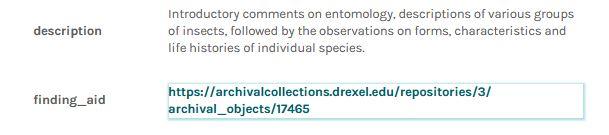
Under your subject image, you can click on the SUBJECT INFO button to learn more about the field journal you're working on. When you open the subject info, you can click on the finding_aid link (right-click and open in a new tab or window so you don't lose your page!) to view a full description of the collection the journal came from. Sometimes this information can help with the transcription process, as it might provide sample subjects or locations mentioned within the journal.
Some journals are available in the Biodiversity Heritage Library (BHL), where you can view every page of the journal in your browser. If the subject info includes a view_on_BHL link, click on the link to go to the journal on BHL. Right-click and open in a new tab or window if you don't want to lose your place on Zooniverse! Viewing the entire journal can be useful if you're particularly interested in a journal's subject matter, or if you want further practice reading the author's handwriting without the pressure of transcribing a page.
What happens when I finish a page and hit DONE? Does the image get taken down?
Zooniverse has a retirement count that determines how many times any image can be viewed by different volunteers before it is taken down, or 'retired.' When you hit DONE, the image can be viewed by other volunteers as long as the retirement count has not been met. When the retirement count is met, that image transcript is considered complete, and this continues until all pages of the field journal are complete. Most of our journals have retirement counts between 5 and 11 -- we are still trying to figure out what number works best.
General Project Questions
What are field journals?
Field journals are handwritten notebooks kept by naturalists when they are on collecting expeditions. During these expeditions, scientists collect plant and animal specimens to bring back to their research institutions or museums. Naturalists in particular often keep track of the species they are collecting, weather reports, habitat descriptions, and interesting events. The contents and style of the field journals vary depending on the author. Some authors are systematic and prefer to write long lists of scientific names; others prefer to write in a narrative format, like a diary, and describe their thoughts and feelings as well as scientific observations. We can learn a lot about nature, the history of science, and more by reading these field journals!
Where did the field journals come from?
The Academy of Natural Sciences (the Academy) holds many field journals in its archives. If you want to learn more about our field journals, you can always email the Library & Archives at library@ansp.org.
You can also search our ArchivesSpace database to view descriptions of other materials in our archives, including field journals. This database contains descriptions of what we hold in our archives, but does not provide digital images of materials. Our staff is happy to help you with any questions you may have about our collections!
More information about the Library & Archives, including how to schedule an in-person appointment, can be found on our website.
What will you do with completed transcriptions?
Completed transcriptions (after being reviewed by at least three volunteers) are uploaded to Biodiversity Heritage Library (BHL) and accompany their respective field journal images. This is done using BHL's transcription upload tool. When transcriptions are added to BHL, the accompanying journals become text-searchable so that researchers can locate specific information within the journals.
How does transcribing field journals help science?
Field journals contain valuable biodiversity data as well as information about the authors of the journals. The vast majority of field journals and other archival items in the Academy's collections are not digitized and must be viewed in-person by appointment. Some of the field journals are old and fragile, and handling them risks damage with every use. Field journals that have been digitized and transcribed are visible online by anyone with a computer and internet connection, and the text within the journals can be searched, highlighted, and copied for various purposes. We can also begin linking data from our field journals to other collections.
Why are you using AI instead of just having people transcribe the field journals?
Academy volunteers have been transcribing collections for a long time, and we still have volunteers who work on transcription projects without the use of AI. However, some of our handwritten journals are especially difficult to read. Using AI handwritten text recognition (HTR) software makes things a little easier by giving us a starting point. Often times we might see a handwritten sentence and have no idea what it says, but we can fill in the blanks if given a few words to start with. AI gives us an extra boost to make the transcription process less intimidating, and teaches us innovative ways to use technology with our collections.
Are you using the data generated by this project as training data for your AI model?
We are currently not using data from this project to train an AI model, but we might do so in the future. For now all data from this project is private and not used for any AI training. The model we are using, known as Textract, is a large language model created by Amazon. Any new training on this model would be facilitated by Amazon without Academy staff involvement.
How will you account for errors in the transcripts, even after they've been reviewed by volunteers?
Academy staff will take a quick, final look at reviewed transcripts using Microsoft Excel and OpenRefine to address any obvious problems. Then we will trust our volunteers and accept that even 'final' transcripts will contain errors. This emphasizes the importance of transparency when presenting transcripts to the public. All transcripts on Biodiversity Heritage Library (BHL) are accompanied by a notice that explains the history of the transcripts, including if they were created by people, machines, or both! BHL viewers also have the ability to contact staff if they find inaccurate transcriptions.